Page: Settings
The Settings page in the XO-VAC+ User Interface software may be used to change the system settings.
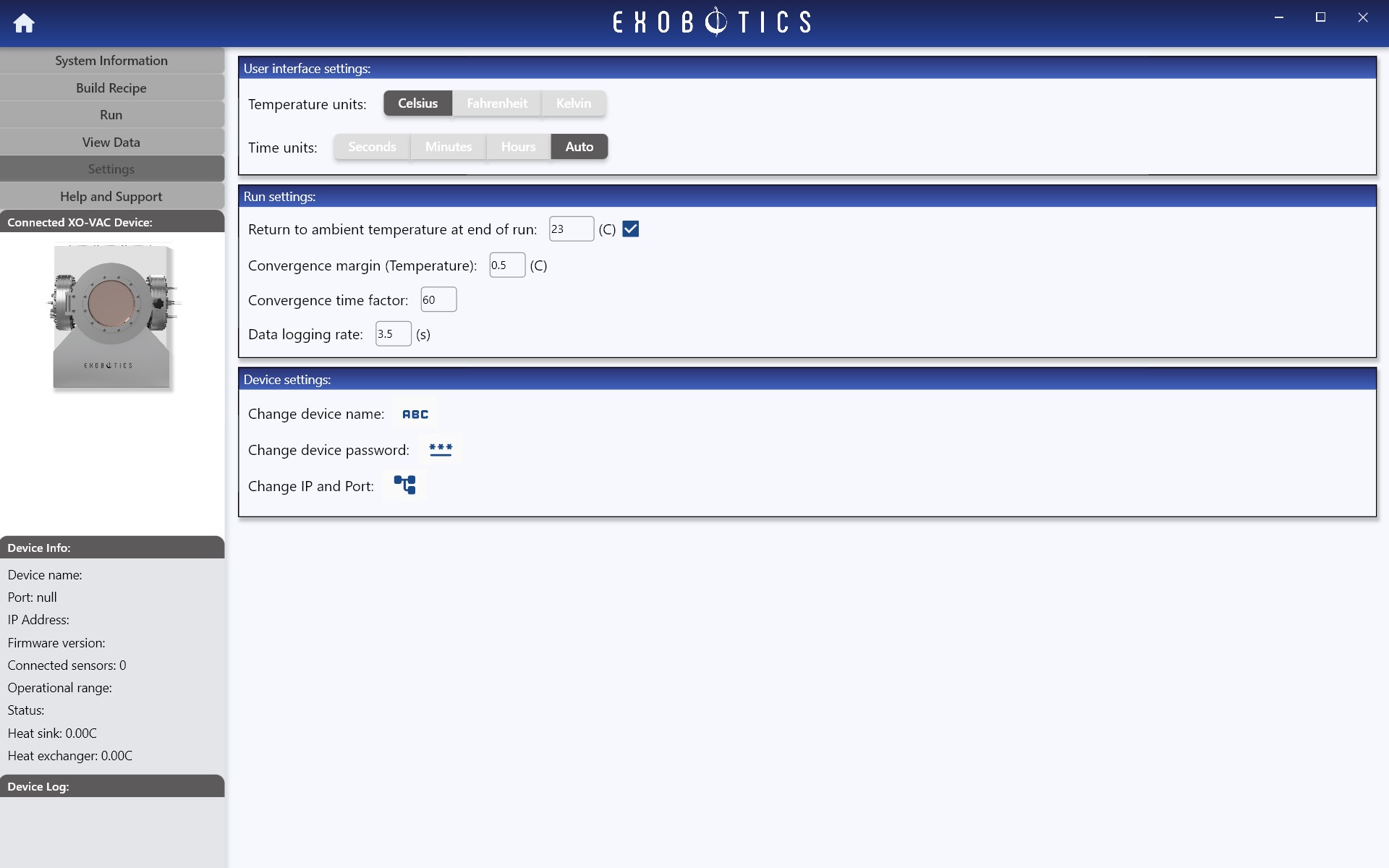
User interface settings
These allow the user to select preferred temperature and time display units for the software. It is possible to change the display units during a run, but note that there may be some lag in updating the live sensor data charts if a large amount of data is being displayed.
Run settings
Note
Run settings are temporary; they only apply to the current session running on XO-VAC+ and will be reset when the device is restarted.
Return to ambient temperature at end of run-
The option to return to ambient temperature at the end of a run is selected by default, and is intended to bring the XO-VAC+ chamber back to a safe temperature before the end of a run to reduce risk of contact with hot parts or damage to the test subject due to rapid cooling in the event the chamber is vented and opened too quickly. The preferred final target temperature may be adjusted.
-
The convergence margins are parameters which are used in the internal system run algorithms to determine when the system temperature has reached targets. It is possible to adjust these which may occasionally help in some cases where the system is struggling to converge or is becoming unstable. In general, however, it is recommended that these values are not changed from the defaults.
Convergence margin (Temperature)-
Temperature margin is the margin above or below a target temperature within which the controller will consider the system to have reached that target, in other words the tolerance or error margin. The recommended value is 0.5C. Larger values will allow the system to accept convergence more quickly but with less precision, and for smaller values the converse is true. For example, if the target temperature is 85C, the system would consider the target to have been reached when the temperature is between 84.5C to 85.5C (so long as various other internal conditions have been satisfied).
Convergence time factor-
The convergence time factor relates to how long the system must be within the convergence temperature margin, before the controller will consider it to have converged. The recommended value is 60 which approximately relates to 60 seconds, although it should be noted that this time is also affected by a number of other internal parameters.
Data logging rate-
Data logging interval may be used to change the interval at which the XO-VAC+ internal data logger records run data. The maximum rate is around every 2s. At the maximum rate a typical XO-VAC+ may generate around 20MB/day of run data. Very large data files may take up to several minutes to import. Using a larger logging interval will reduce the size of the data files to be imported at the end of a run. The table below gives an indication of approximate run data file sizes and recommended logging rates for different run times for a standard XO-VAC+:
Length of Run Recommended Max Log Interval Approximate Data Log Size 24 hours max 20MB 3 days 10s 20MB 10 days 15s 30MB 30 days 20s 60MB Note
A 50MB run data file may take around 30s to import from the device. Very large run files may take several minutes.
Device settings
In the device settings toolbox it is possible to change various configuration parameters that are stored permanently in the XO-VAC+.
Change device name-
The device display name can be changed for convenience (max length 40 characters). It is particularly useful when managing a fleet of XO-VAC+.
Change user password-
The
Change user passwordsetting may be used to change the user password, or remove the password. To remove the password, simply leave thenew passwordfields blank and then confirm the change. Any user password that is set will be used to encrypt communications between the PC running the XO-VAC+ User Interface software and the XO-VAC+.
Info
Encryption is maintained between the XO-VAC+ Server and Client even if the user password is removed.
Change IP and Port-
The
Change IP and Portsetting may be used to change the XO-VAC+ connection parameters. Do not change these parameters if you are unsure of the implications and principles of network settings. To update the IP or Port, first assign the new IPv4, subnet mask, or port numbers using this setting. The device subnet mask is 255.255.255.0 by default. The changes will not take effect until the next time the XO-VAC+ device is restarted. When the device is restarted, wait for approximately 1 min before logging on using the new parameters.Warning
When changing connection parameters the user should take great care to note the new IP address, subnet, and/or Port, in order to be able to reconnect to the device! The new values will be temporarily (while the software remains open) available in the user interface system log on the System Information page.
Note
The user should take great care in selecting a new IP address to ensure it is compatible with their network. The XO-VAC+ default subnet mask is 255.255.255.0. Incorrect changes may render the device inaccessible!
Tip
If the XO-VAC+ has invalid network settings or if the user do not remember what settings were implemented, XO-VAC+ can be reset to factory defaults.