Page: Build Recipe
The Build Recipe page in the XO-VAC+ User Interface software allows you to construct a test plan or recipe to run on the XO-VAC+ device. A recipe consists of a sequence of thermal steps specified as a target temperature and a minimum duration over which that target temperature is to be achieved.
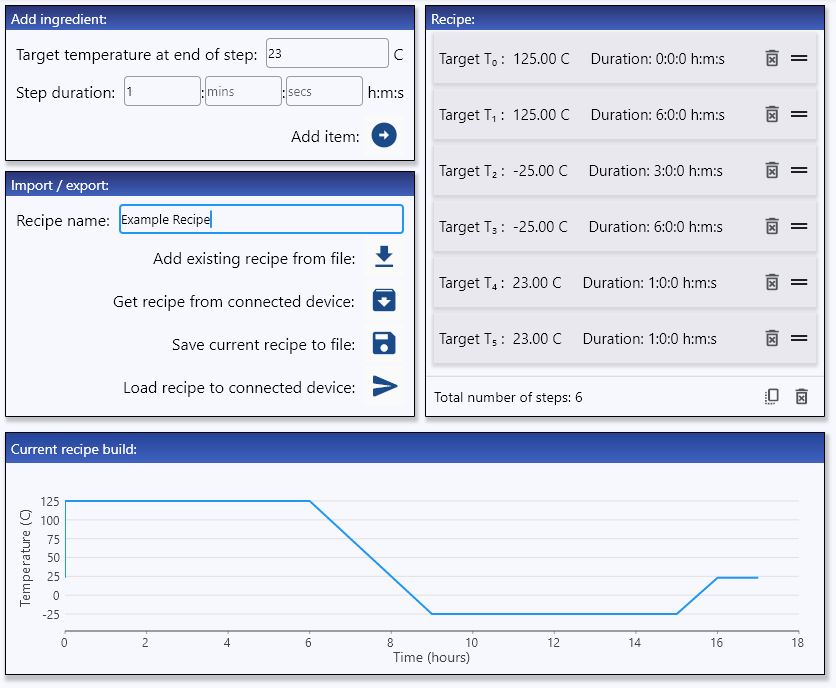
A thermal step may be of two types, firstly a ramping step over which the system is running to a new target temperature, and a holding step for which the target temperature is identical to that of the previous step.
For example, a simple four steps recipe consisting of running to 70C from ambient and holding for 8 hours then running to -5C and holding for 8 hours, could look like the following:
| Step type | Target temperature (C) | Step duration (hrs) |
|---|---|---|
| Ramp | 70 | 4 |
| Hold | 70 | 8 |
| Ramp (max) | -5 | 0 |
| Hold | -5 | 8 |
Note how the thermal ramp up to 70C from ambient and the 8hrs holding at 70C are specified as two separate steps.
The thermal ramp up to 70C has been specified with a step duration of 4 hours, however it is important to note that for thermal ramping steps this step duration is only approximate - the specified duration will be a lower bound on the actual step duration, which may be longer depending on the target and the physical limitations of the system.
To run at max speed to a target it is possible to specify a ramp duration of 0 (as in the case of the step from 70C to -5C in the example above), however note that a ramp step in most cases will take a minimum of at least 3 hours due to the physical limitations of the system.
Recipe panel
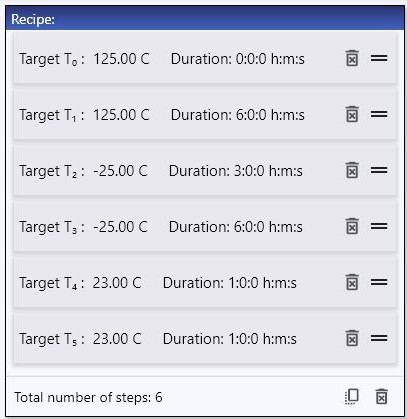
The Recipe panel displays the current recipe build, with a tile corresponding to each step. Tiles may be reordered or deleted using the icons on the right hand side. The recipe build is also displayed graphically in the Current recipe build panel.
Note
By default the system will add a final step to any recipe to bring the system back to ambient temperature at the end of a run - this may be changed in the Settings page.
Add ingredient panel
The Add ingredient panel enables addition of new recipe steps to the recipe build. Note, any number of hours, minutes, or seconds may be entered and any fields left blank will be treated as 0. To further increase the efficiency of building recipes, Duplicate all and Delete all functions are provided at the bottom right of the Recipe panel. Further combinations of recipes may be built quickly by importing previously saved recipe fragments.
Import/export panel
This panel enables you to name your recipe, save your recipe, import a previously saved recipe, import the recipe (if any) currently loaded on a connected XO-VAC+, or load your current recipe (as displayed in the Recipe panel) to the connected XO-VAC+ device.
Note that loading a recipe to a connected device will automatically overwrite any recipe that is currently stored on that device. Loading a recipe to a device is only possible when the status of the device is idle. Any recipe loaded to a device will be lost when the device is powered down or restarted, therefore it is recommended to save a local copy of your recipe for future use or reference. Recipes that are run get appended to the run data files that may be imported and saved.