How do I: Enable the vacuum pump?
Tip
Hardware information about the vacuum pumps is available here.
Danger - Fire & Electric Shock Hazards
Do not operate the XO-VAC+ Thermal System without the chamber being under vacuum!
XO-VAC+ is a Thermal Vacuum Chamber capable of operating in a wide range of temperatures (from -25C to 125C). If the main chamber is not under vacuum and the Thermal System is used, XO-VAC+ can get damaged. During a hot run, the main risk is to oxidize the shroud and compromising the radiation performance of the chamber. Cold runs are much more hazardous has water can condensed inside the chamber and create short circuits.
Note
XO-VAC+ can, however, be safely used as a Vacuum Chamber without using the Thermal Control system or running a recipe.
Step 1 - Inspection
The first step is to assess the state of XO-VAC+. The following questions can help the user understanding the status of XO-VAC+:
Is it powered on?
To be able to pump down main chamber to vacuum levels, XO-VAC+ needs to have its Vacuum Control box powered on. If it is powered on, the display in front of the Vacuum Cntrol box will be powered on.
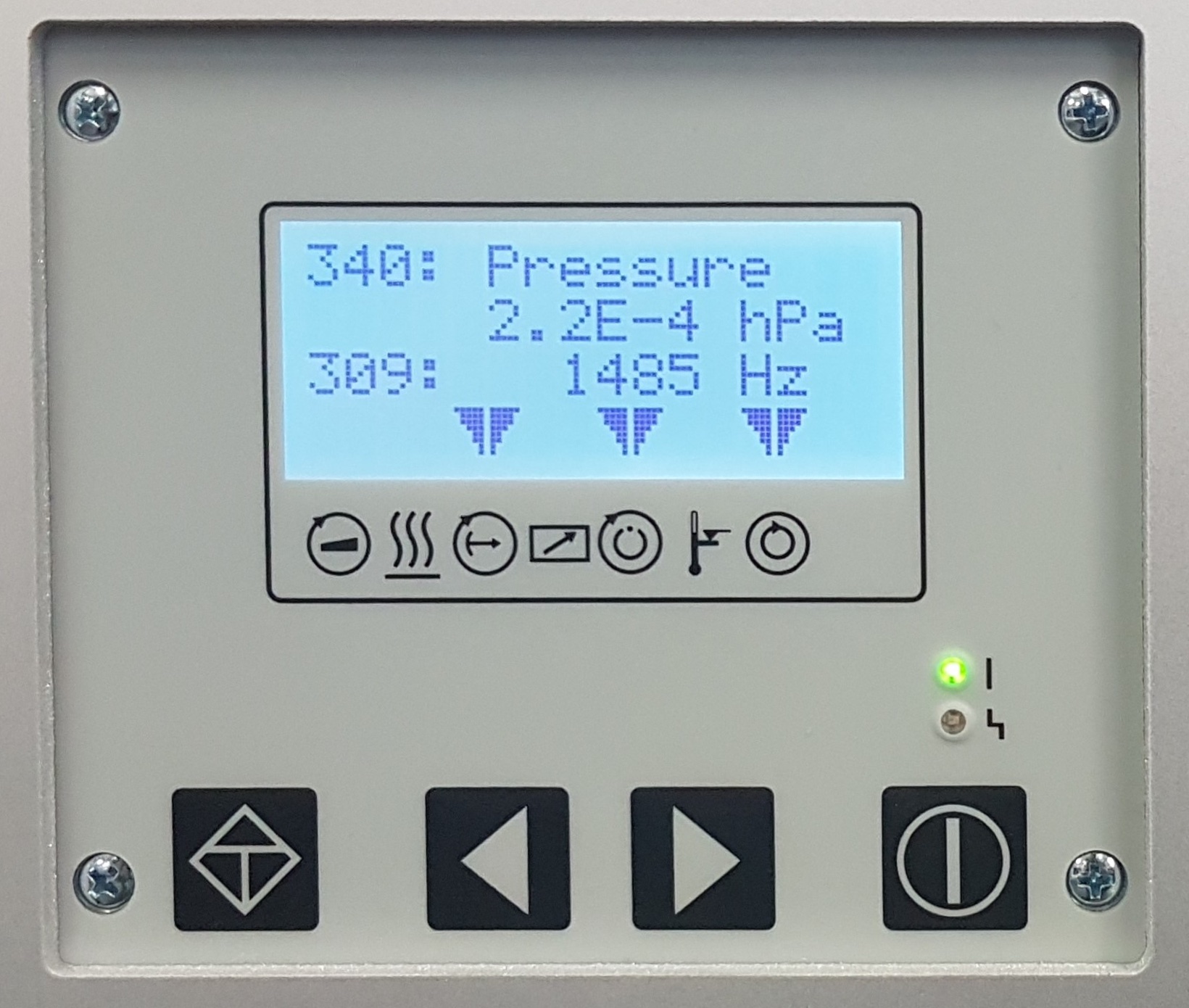
If it is powered off, check that the Vacuum Control box is connected to mains and that the Vacuum Control box entry connector switch is switched on.
Note
If only the Vacuum Control box is used, the D-Sub 25 cables do not need to be connected. There are also no issues in leaving the D-Sub 25 cables connected.
Is it under vacuum?
XO-VAC+ is designed to not automatically vent after a power failure to protect the test payload and XO-VAC+ from oxidation, thermal shock and condensation. It is possible that XO-VAC+ is under vacuum even though it is not powered or connected.
Note
It is recommended to keep the chamber of XO-VAC+ under vaccuum when not in use to protect the chamber from contaminations.
The Vacuum Control panel needs 1 to 2 minutes to boot after being powered on.
Before trying to open chamber, check that:
- The turbo vacuum pump is powered off (0 Hz)
- The vacuum chamber is at room pressure (> 1E3 hPa)
To check the vacuum chamber pressure, use the Left or the Right arrows until the code 340 is visible. It indicates the pressure in the vacuum chamber.
To check the turbo vacuum pump speed, read the value next to the 309 code on the Vacuum Control Panel. It indicates the turbopump rotation speed in Hz. If it is equal to 0 Hz, it means that the turbo is stopped.
Is the Thermal System running?
If the white LED indicator on the front of XO-VAC+ is not powered on, it means that the Thermal Control system is not running as it is not powered on.
However, the white LED can be on while the Thermal System not running. To be sure that the Thermal System is off it is possible to:
- Turn off and on the Thermal System with the key switch at the front or the switch at the back on the power entry connector.
- Connect to XO-VAC+ using the XO-VAC+ User Interface and check that XO-VAC+ is in
Idlemode
Is it possible to connect to XO-VAC+?
If after pumping down the chamber to vacuum levels the user wants to operate the Thermal Control system, it is important to verify that it is possible to connect to XO-VAC+.
Detailed steps on how to connect to XO-VAC+ are available here
Is the chamber at ambient temperature?
Connect to XO-VAC+ using the XO-VAC+ User Interface to check the sensor temperatures within the main chamber.
Danger
Only vent the chamber if it is at temperatures 5 degrees above the water dew point and below 40C. You can determinee the current chamber temperatures by connecting to XO-VAC+.
Tip
The water dew point can easily be estimated with online calculators if the room humidity is known.
Is the chamber door o-ring clean?
With time, dust can accumulate on the chamber door o-ring and create leaks. It is good practice to inspect the o-ring before pumping down the chamber to vacuum levels.
To check the state of the door seal:
- Open the vacuum chamber door
- Inspect the chamber door o-ring for visibile damage or particulates
- If particulates are present remove them delicately with a lint-free cloth (e.g. cleanroom wipes). A few drops of IsoPropyl Alcohol (IPA) on the cloth can help.
- Inspect the mating surface of chamber door o-ring on the chamber body
- If particulates are present remove them delicately with a lint-free cloth (e.g. cleanroom wipes). A few drops of IsoPropyl Alcohol (IPA) on the cloth can help.
Warning
Do not use abrasive materials or sharp tools as they can easily damage the soft o-ring rubber.
Warning
Be careful not to scratch the mating surface of the o-ring on the main body of the vacuum chamber.
Note
If the chamber door o-ring is damaged, a replacement can be bought from Exobotics and installed by the end user.
Is there a payload in the chamber?
Before running XO-VAC+, it is important to check that the vacuum chamber does not contain objects or test equipment that could be damaged or dangerous under the new test conditions.
Is the vacuum chamber clean?
Exobotics recommends users to keep a logbook of what has been tested, under what conditions, for how long and by whom. It is valuable information for when someones want to investigate possible sources of contamination.
Note
Always use clean powder free gloves when touching vacuum parts or equipment going inside the vacuum chamber.
Warning
If gloves touch a contaminated surface, they can become contaminated by transfer.
Note
Always leave parts on clean surfaces and limit vacuum parts exposure to air (to limit dust collection).
The main sources of contamination in vacuum chambers are often:
- skin oil / finger grease
- surrounding environments (dust in air)
- materials being tested
If a new device or equipment has been installed inside in the chamber, it is recommended to clean the parts of the chamber the more likely to get contaminated. See the cleaning page for more.
Are there any hazardous objects in the chamber?
A lot of everyday objects are extremely hazardous in vacuum chambers. Be cautious with what is inserted in the chamber.
Warning
Objects with high outgassing properties (TML > 1 %, QCQM > 0.1%) should not be used in a vacuum chamber as they can contaminate the entire vacuum chamber, the vacuum pumps and future equipment being tested in the chamber.
Note
Databases of material outgassing properties are available online. The one maintained by NASA (https://outgassing.nasa.gov) can be particularly useful in assessing the outgassing properties of a material.
Danger
Samples or devices with trapped air or other gases can explode in vacuum.
Danger
Liquids or wet (water, IPA, other solvents) objects can damage and contaminate the chamber.
Step 2 - Turn on the Vacuum System
Once all the checks are completed and passed, it is safe to turn on the vacuum system.
Press the on/off button (cicle with a vertical bar) on the right side of the Vacuum Control Panel.
To display the pressure in the Vacuum chamber use the Left or the Right arrows until the code 340 is visible.
An empty and clean XO-VAC+ can reach 5E-5 mbar/hPa under 15 min and can reach 1E-7 mbar/hPa have been achieved with an empty and clean XO-VAC+.
If the XO-VAC+ cannot attain this performance level check the Troubleshooting section.